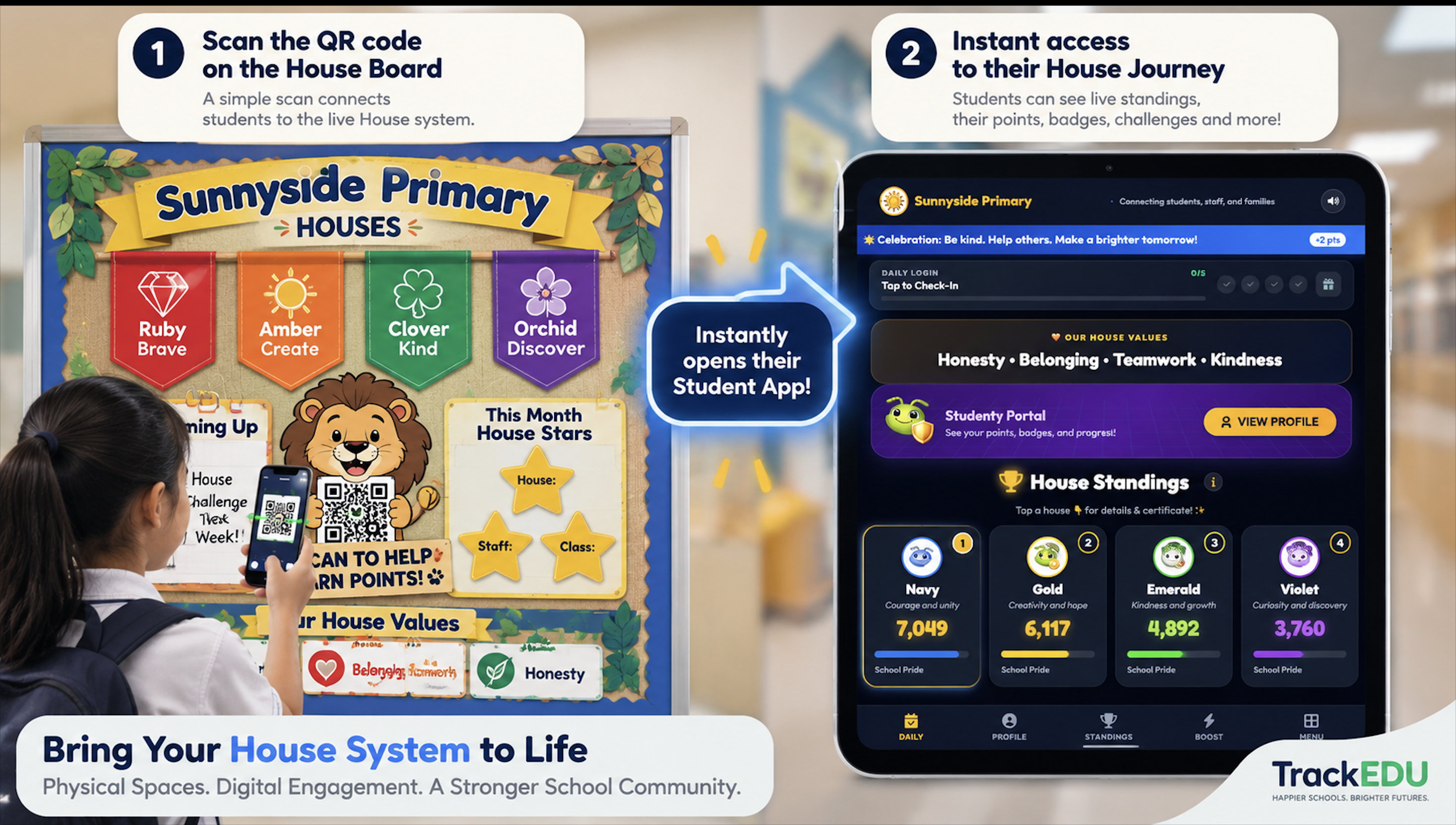

TrackEDU helps teachers award points in seconds, gives students a secure portal to track progress, and gives school leaders clear visibility across houses, values and rewards.
AI learning & digital education projects
Google and Firebase are trademarks of Google LLC. TrackEDU is not affiliated.
Watch how the Teacher App and Student Portal connect student recognition, rewards, house points and support in one school culture platform.
See the Teacher App and Student Portal in action, in 46 seconds.
Bill Saddik
Founder · Educator · TEDx SpeakerTrackEDU was created to help schools make recognition, rewards, house points, values and student support easier to see, manage and celebrate.
School culture should not live in spreadsheets. It should be visible, positive, and easier for teachers to manage every day.
Clearer visibility across recognition, rewards and student support patterns.
Faster classroom tools, easier point awards, and less repeated admin.
Visible progress, badges, group identity, and positive motivation.
Many schools still manage house points, rewards, student motivation and follow-up through disconnected spreadsheets, emails and classroom tools. TrackEDU brings recognition into one clear system.
Spreadsheets, paper slips, emails and classroom tools can all end up holding different parts of the story.
It becomes harder to see which houses, year groups, classes or students are being recognised consistently.
Points are more meaningful when students can see progress, badges, house identity and rewards clearly.
Teachers and leaders often spend extra time updating lists, totals, leaderboards and reward records manually.
The result:
Fragmented systems. Inconsistent data. Burned-out staff.
Teacher tools + student portal + behaviour support, connected in one system.
Award points. Instant leaderboard. Live analytics for school leaders.
Badges, daily streaks and house or team progress, with student-friendly visibility.
Pre-Tier 1 to Tier 3. Parent logs. Exportable reports.
What changes:
One system. Three tools. Complete visibility.
Help shape TrackEDU while your school receives 1 year of full access with the licence fee waived.
1 Year Free
Licence waived
Training
Staff support
Priority Support
Dedicated contact
Early Innovator
Featured school
Teachers award points quickly. Students see their progress. School leaders get a clearer view of recognition, participation and house activity.
Simple classroom tools to recognise effort, values and contribution.
A fun, secure dashboard where students track their success.
TrackEDU supports schools that already run houses, points, pastoral systems, or behaviour workflows, and schools starting from scratch.
TrackEDU has been refined through feedback from educators and school teams, helping us improve daily workflows, implementation needs, and product usability.
Magic Hat was born from:
Teachers asked for a fair way to call on students without bias. We built a random picker that also awards points.
Behaviour Support came from:
School leaders couldn't see patterns across spreadsheets. We built tiered tracking with automatic escalation.
Student Portal came from:
Students wanted to see their progress. We built 3D badges, streaks, and house reactions to make engagement visible.
Quick Quiz came from:
Teachers needed ready-to-use questions for assemblies. We built a library of 250+ SEL and values questions.
TrackEDU is built to save teachers time, keep students proud of their house teams or school groups, and make school success easy to see.
No more messy spreadsheets or lost paper slips. Teachers use the app to award points in just a few clicks during class or assemblies.
The student portal keeps children happy and motivated. They can view their streaks, check their badges, and support their houses.
Keep house standings clear and visible. School leaders can load live, up-to-date leaderboards on any screen for the entire school to follow.
Choose the path that fits where you are now, individual teacher, school pilot, or full annual licence.
For individual teachers who want to try TrackEDU with one class.
For schools that want to test TrackEDU properly before deciding.
For schools ready to continue after the pilot, with recognition, behaviour support and basic facility booking included.
Selected schools may receive 1 year of access with the licence fee waived, plus training and priority support.
Pilot and Founding Schools receive practical help with setup, staff confidence, and early implementation.
Guided setup for school administrators and pilot leads.
Support so teachers use TrackEDU confidently.
Practical help during your first weeks of school-wide use.
Start a 30-day pilot or book a short walkthrough to discuss setup, data, and implementation for your school.
Try the Teacher App, Student Portal and recognition tools with no credit card required.
Speak with TrackEDU about school fit, onboarding, privacy, and implementation.
Start your 30-day pilot with Google sign-in, guided school setup, and CSV student import. No credit card required, no long onboarding process, just a clear first step.
Use your school Google account to begin setup and access the TrackEDU dashboard.
Add your school details, houses, classes, and setup information in a guided workflow.
Upload your student list, then give staff access to the Teacher App, Student Portal and recognition tools.
Watch how a school account is created and prepared for a 30-day TrackEDU pilot.
Watch how student data can be prepared and imported using the CSV workflow.
We ship often. Here's what we've added recently and what we're building for your school.
Latest updates to help your classroom
An interactive noise meter that helps students self-regulate volume through friendly visual feedback. Perfect for maintaining focus during different activities.
1. Choose an activity mode (Silent Reading, Pair Work, etc.)
2. Set a calm goal (start with 1 minute)
3. Press Start — only sound level is monitored
4. Students follow the big message: Green ✅, Yellow ⚠️, Red 🛑
5. Reward calm teamwork automatically or manually
💡 Tip: Use Classroom View + Full Screen on smartboards.
Generate beautiful, printable certificates for students in seconds. Perfect for awards ceremonies, end-of-term, or recognizing daily wins.
1. Select a student (or multiple for Batch Mode).
2. Choose a template: Star of the Week, Most Improved, etc.
3. Customize the message and add a personal note.
4. Pick a theme color or use the student's house color.
5. Click "Generate Poster" to preview.
6. Download as PNG or print directly.
💡 Pro tip: Batch Mode saves hours at the end of term.
Log incidents, track patterns, and manage tiered interventions all in one place. Automatic escalation ensures the right people are notified at the right time.
📝 Log Incidents: Quick presets with severity levels.
📊 Track Patterns: See which times/days have the most incidents.
🔄 Auto-Escalation: Moves through 4 tiers (Teacher → SAC → SLT).
✅ Manage Tasks: Track follow-ups like parent meetings.
📍 Access: Teacher App → Behaviour Support button.
What we're building next
Arabic language support
Full RTL interface
Parent-teacher meeting tool
Schedule, manage, and track parent-teacher conferences directly in TrackEDU
Facilities Management System
Room bookings, shared space scheduling, approval workflows, maintenance blocks, and custodian exports — available now as a standalone system or part of the full platform.
Google Classroom integration
Sync rosters, assignments, and points between platforms
Teacher-managed student tools
Adapt Recognition Lead tools (e.g., Student Voice polls) for per-class use
Collectable cards (physical)
Parents can purchase the complete album at the end of the academic year
Spanish language support
Following Arabic, based on demand from Spanish-speaking schools
Tangible house awards
Physical prizes delivered to the winning house at the end of the academic year
Have a feature idea?
TrackEDU users can request features directly inside the Teacher App. Your feedback shapes our roadmap.
Log in to request a featureTrackEDU updates continuously. Version 2.4 – October 2024
TrackEDU and Pathwise Academy partner to bring AI and Digital tools to schools.
TrackEDU uses these trusted services to power the platform.
Google Sign-In
Authentication
Firebase
Cloud database
Google and Firebase are trademarks of Google LLC. TrackEDU is not affiliated with or endorsed by Google.
Clear answers for school leaders, teachers, and pastoral teams before starting a pilot.
© 2026 TrackEDU Ltd.
Registered in England & Wales, No. 17216557
128 City Road, London, EC1V 2NX, UK