Stop room clashes before the school day starts.
TrackEDU Facilities is a school room booking and campus room scheduling system for classrooms, halls, labs, libraries, sports spaces and other shared facilities, with Google Calendar integration, approvals, closures and Operations requests.
The live operations view your campus probably does not have yet.
Staff see what is available. Administrators approve high-demand spaces. Site teams know what needs setting up. Leaders get visibility over how shared spaces are being used.
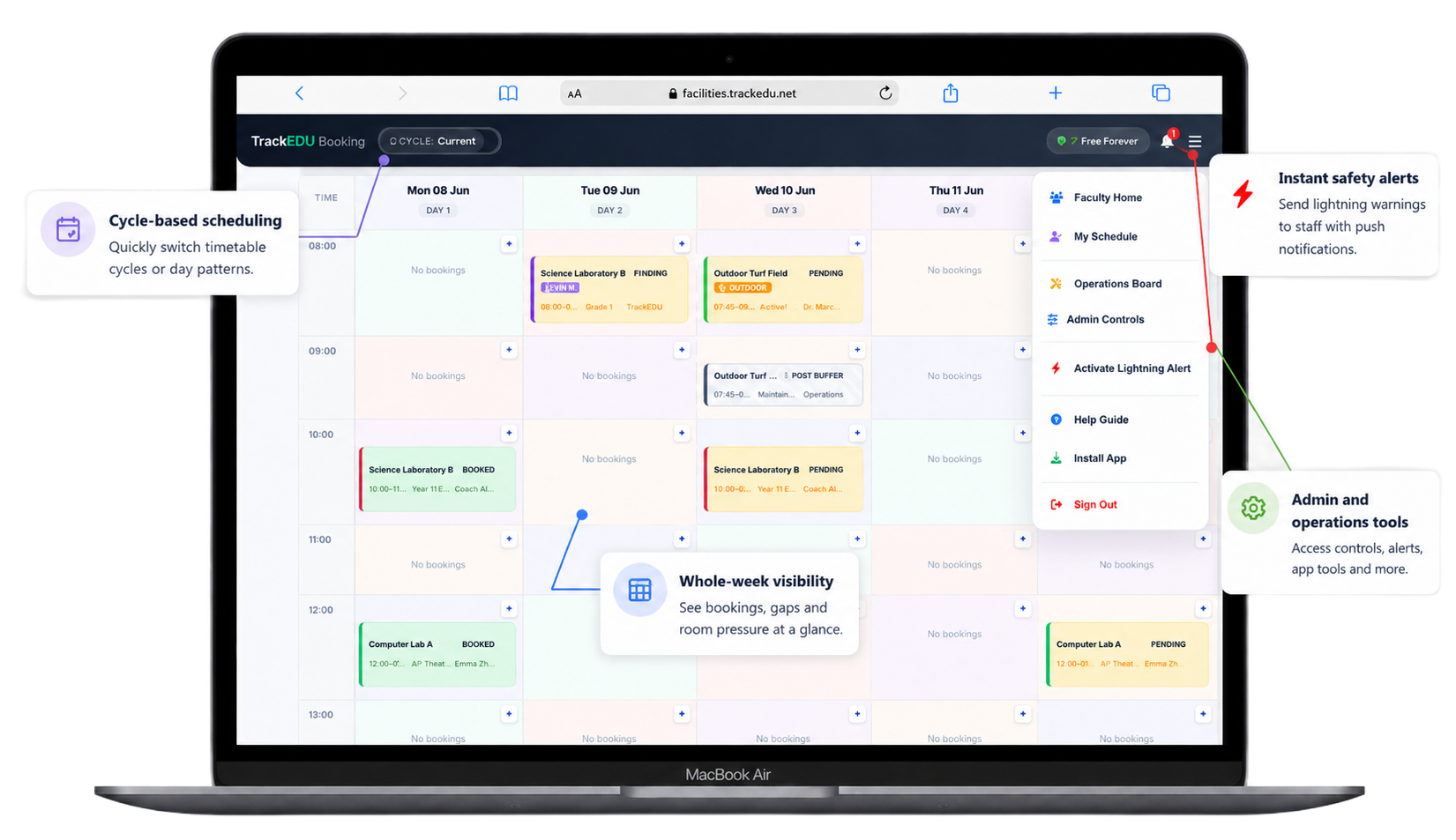
See the problem before it becomes another staff email chain.
See how staff find available rooms, avoid clashes, request shared spaces and keep site teams informed from one clear booking calendar.
A campus room scheduling system built for the spaces schools actually share.
Manage classrooms, halls, libraries, labs, sports spaces and other shared facilities from one booking system for schools, colleges and universities.
PE Departments
Manage sports halls, fields, courts, gyms, fixtures and shared PE spaces from one clear booking calendar.
Libraries
Let staff book reading rooms, study spaces, library lessons, class visits and events without another email chain.
Operations Teams
Keep setups, closures, maintenance blocks, room approvals and site-team requests visible before the school day starts.
Built around real campus booking problems.
“The library schedule tool Bill created has been a game changer.”
A Teacher Librarian at the Canadian International School in Singapore explains how a custom scheduling tool helped simplify daily library bookings and shared space management.
Head Librarian
Canadian International School, Singapore
Book once in TrackEDU. Keep Google Calendar up to date automatically.
Staff can connect Google Calendar directly to TrackEDU Facilities. Confirmed bookings can be created, updated and removed automatically as booking details change.
Google Calendar uses direct authenticated integration. Apple Calendar and Outlook can use TrackEDU secure calendar feeds. TrackEDU is not affiliated with or endorsed by Google.
Invite staff without opening the gates to everyone.
Admins share a secure onboarding link and a unique school access code. Staff request access, appear in the pending queue and join only after approval.
Start free, then scale when your team is ready.
TrackEDU Facilities is priced around bookable spaces and staff users, not confusing per-booking fees.
Start with 90 days of Pro included.
New schools, colleges and universities receive full TrackEDU Facilities Pro access free for 90 days from signup.
Includes up to 30 bookable spaces and 200 staff users. No credit card required and no commitment. After the trial, continue on Pro for USD 399/year or move to Free Starter.
Free Starter
For testing the room-booking workflow with a small team.
- 1 bookable space
- Up to 10 users
- QR check-in and basic booking tools
Pro Plan
For organisations ready to manage shared spaces properly across teams.
New school workspaces receive full Pro access for 90 days from signup.
- Up to 30 bookable spaces
- Up to 200 users
- Operations Board, recurring bookings and exports
Ultimate Plan
For larger campuses, multi-site groups and complex operations.
- Custom space and user capacity
- Guided setup discussion
- Best for complex campus operations
TrackEDU Ltd, UK Company 17216557. ICO Registered Data Protection: ZC146923.
Need the detailed plan breakdown?
The pricing cards cover the essentials. Open the full comparison if your school needs to check spaces, users, recurring bookings, operations support and onboarding details.
Frequently asked questions.
Which TrackEDU Facilities plan should we start with?
Free Starter is best for testing the system with 1 bookable space and up to 10 users. Pro is designed for most schools, with up to 30 bookable spaces and up to 200 users. Ultimate is for larger schools, colleges, universities and multi-site groups that need custom capacity and implementation support.
Is this only for classrooms?
No. Schools can add classrooms, halls, labs, libraries, sports areas, auditoriums, meeting rooms and other shared spaces.
What is a campus room scheduling system?
A campus room scheduling system helps schools, colleges and universities manage shared classrooms, halls, labs, libraries, sports spaces and other facilities from one booking calendar. TrackEDU Facilities combines live availability, approvals, recurring bookings, closures and staff access controls in one system.
Do staff need another username and password?
No separate TrackEDU password is required when your organisation uses supported Google or Microsoft sign-in. Staff can use familiar school accounts, subject to your organisation’s access and approval settings.
Can some rooms require approval?
Yes. High-demand spaces can require administrator approval, while everyday spaces can be available for faster instant booking.
Can staff use it on mobile and tablet?
Yes. The facility portal is web-based and works across phones, tablets and desktop devices. It also supports progressive web app installation for quicker access.
Can rooms be blocked for maintenance, events or bad weather?
Yes. Administrators can close rooms or outdoor spaces for repairs, exams, events, holidays, severe weather or planned maintenance.
Does TrackEDU Facilities integrate with Google Calendar?
Yes. Staff can connect Google Calendar directly to TrackEDU Facilities. Confirmed bookings can be created in the connected Google Calendar, updated when booking details change and removed when the booking is cancelled. TrackEDU's requested Google Calendar data access has completed Google OAuth verification.
Can we try TrackEDU Facilities before purchasing?
Yes. New school workspaces include 90 days of full Pro access with up to 30 bookable spaces and 200 users. No credit card is required. After the trial, you can continue on Pro for USD 399/year or move to Free Starter.
Replace spreadsheet booking and room confusion with one clear campus calendar.
Start small with one department or move straight to a campus-wide room booking workflow.