TrackEDU Help Center

Guides for teachers, students, pastoral teams, and school leaders.

Learn how to set up TrackEDU, award house points, import students, use the Student Portal, manage behaviour records, and support school-wide culture from one connected platform.

Quick Start

Choose the guide that matches your role.

TrackEDU works across several school roles. These quick-start paths help each user begin from the right place.

Teacher Guide

How teachers use TrackEDU day to day.

The Teacher App is the classroom command centre. Teachers can award points, manage classes, use classroom tools, generate certificates, run activities, and support positive student participation.

Open Teacher App

Teacher quick steps

1

Sign in or join your school

Use your Google account. If your school already exists, join using the school join code provided by your administrator.

2

Open Student Management

View students, filter by class or house, add students manually, or work from the imported roster.

3

Award points

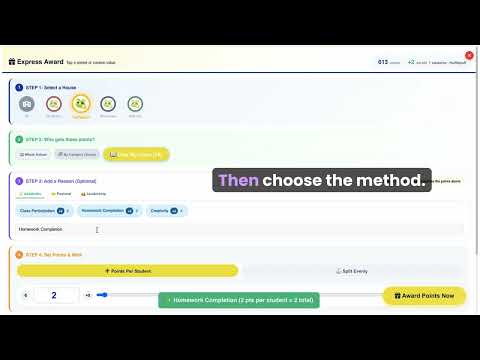
Tap a student, select multiple students, award a whole class, or award a whole house for shared achievements.

4

Use classroom tools

Use Magic Hat, Focus Timer, Group Builder, Quick Quiz, Class Calm Meter, Certificate Studio, and other tools to support classroom routines.

5

Review history

Check award history, review student progress, and correct mistakes when needed.

Tip: use the Teacher App on a laptop, tablet, smartboard, or phone. TrackEDU works through the browser, so no app store download is required.

Student Guide

How students access points, badges, streaks, and house progress.

The Student Portal helps students see recognition, understand house progress, collect rewards, and participate in school culture. Students do not need personal email accounts.

Student ID login

Students use an auto-generated ID token and a class passcode provided by the teacher.

Badge collection

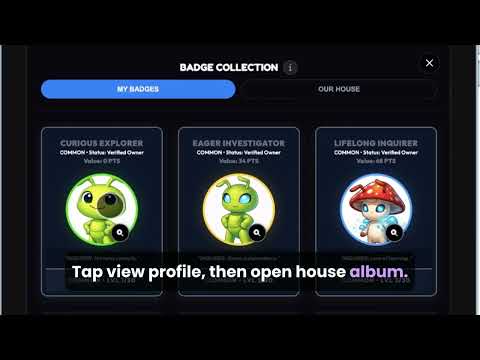
Students can view points, unlock badge tiers, and follow their progress.

Daily streaks

Students can check in and build routine participation through daily streaks.

House identity

Students can see live house progress and support their house through participation features.

Student quick steps

  1. 1.Open the Student Portal link provided by the teacher.
  2. 2.Enter the student ID token and class passcode.
  3. 3.Check your points, house, badge progress, and streaks.
  4. 4.Participate in polls, mystery word missions, and house features when enabled by the school.
  5. 5.Add TrackEDU to the home screen for faster access on mobile or tablet.
Behavior Tracker Guide

Track incidents, interventions, follow-ups, and pastoral patterns.

The Behavior Tracker gives authorised staff a structured way to record behaviour information, identify patterns earlier, and support students through tiered intervention workflows.

Log incidents

Record incidents using structured fields, severity levels, student details, notes, and action taken. This reduces reliance on scattered emails or informal notes.

Track intervention tiers

Track behaviour support across stages such as classroom-managed concerns, pastoral follow-up, senior leadership involvement, and structured support planning.

Export records

Export behaviour records and reports to support pastoral meetings, leadership review, parent communication, and school documentation.

Suggested behaviour workflow

1. Record

Log the incident with student, class, context, severity, and notes.

2. Review

Check patterns by student, class, grade, date, or repeated behaviour type.

3. Follow up

Add actions such as parent contact, reflection, counselling referral, or team meeting.

4. Export

Export records for review, reporting, or school documentation.

School Setup

Create your school in 5 to 10 minutes.

School leaders and administrators can set up a TrackEDU school space, configure houses, import students, add staff, and begin a 30-day pilot.

Create Your School

Setup checklist

Sign in with Google

Use a school Google account to begin setup.

Create school space

Add school name, country, school details, and initial settings.

Configure houses

Add house names, colours, emojis, mottos, and structure.

Import students

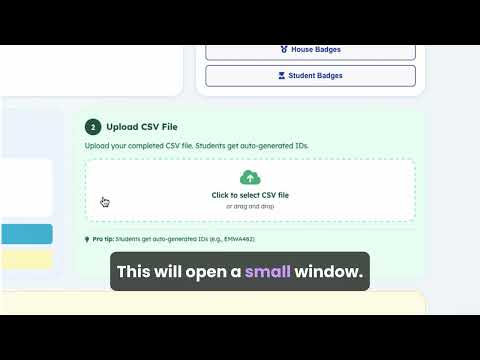
Prepare a CSV file and import student details into TrackEDU.

Invite staff

Provide teacher access and assign appropriate roles.

Launch pilot

Begin using Teacher App, Student Portal, and Behavior Tracker.

CSV Import Guide

Prepare your student data before import.

TrackEDU uses CSV import so schools can prepare student records in a spreadsheet before uploading them into the system.

Recommended fields

  • Student first name
  • Student last name or initial
  • Class or homeroom
  • Grade or year group
  • House name
  • Optional student reference

Before uploading

  • Check spelling consistency
  • Keep house names consistent
  • Remove duplicate rows
  • Use one row per student
  • Remove unnecessary personal data

After import

  • Check student count
  • Review houses and classes
  • Generate student access details
  • Test with a small staff group
  • Begin pilot use
Keep the import file simple. TrackEDU does not need unnecessary demographic data to operate the house points and student engagement system.
Video Tutorials

Watch TrackEDU in action.

These short tutorials help staff and school leaders understand setup, student import, awarding points, and daily use.

Billing and procurement

School payment and invoice support.

Schools can begin with a free 30-day pilot. After the pilot, early adopter annual licences start from USD 3,000/year. Schools can request an invoice, pay by bank transfer, or request a secure card payment link.

  • Invoice request available
  • Bank transfer and secure card payment link options
  • Manual licence activation after payment confirmation
  • No automatic renewal
Privacy and trust

Designed with student data in mind.

TrackEDU uses secure cloud infrastructure, no advertising, no selling of student data, and student access without requiring personal student email accounts.

  • School-controlled exports
  • Student access without email accounts
  • Privacy-conscious architecture
  • ICO registered, Ref: ZC146923
Help Center FAQ

Common support questions.

How do teachers join an existing TrackEDU school?
Teachers can sign in with Google and use the school join code provided by the school administrator. Once joined, they can access the Teacher App and relevant school tools.
Can one teacher use TrackEDU without the whole school joining?
Yes. Individual teachers can use the free Teacher Starter option with one class. For whole-school use, a school leader should create or approve the school space.
Do students need email accounts?
No. Students can access the Student Portal using an auto-generated student ID token and a class passcode. This helps reduce unnecessary student data exposure.
Can TrackEDU replace spreadsheets for house points?
Yes. TrackEDU is designed to reduce manual spreadsheet tracking by connecting points, houses, students, classes, leaderboards, reports, and exports in one platform.
Can behaviour data be exported?
Yes. Authorised users can export relevant behaviour records and reports for review, meetings, and school documentation.
How does TrackEDU support school leaders?
TrackEDU gives leaders visibility across house points, student engagement, behaviour records, pastoral patterns, exports, and implementation workflows.
How much does TrackEDU cost after the pilot?
TrackEDU offers a free 30-day school pilot. After the pilot, early adopter annual school licences start from USD 3,000/year. Final pricing may vary by school size, implementation needs, support requirements, and rollout scope.

Ready to set up TrackEDU?

Start a 30-day school pilot, explore the tools, and decide whether TrackEDU is the right fit for your school culture system.