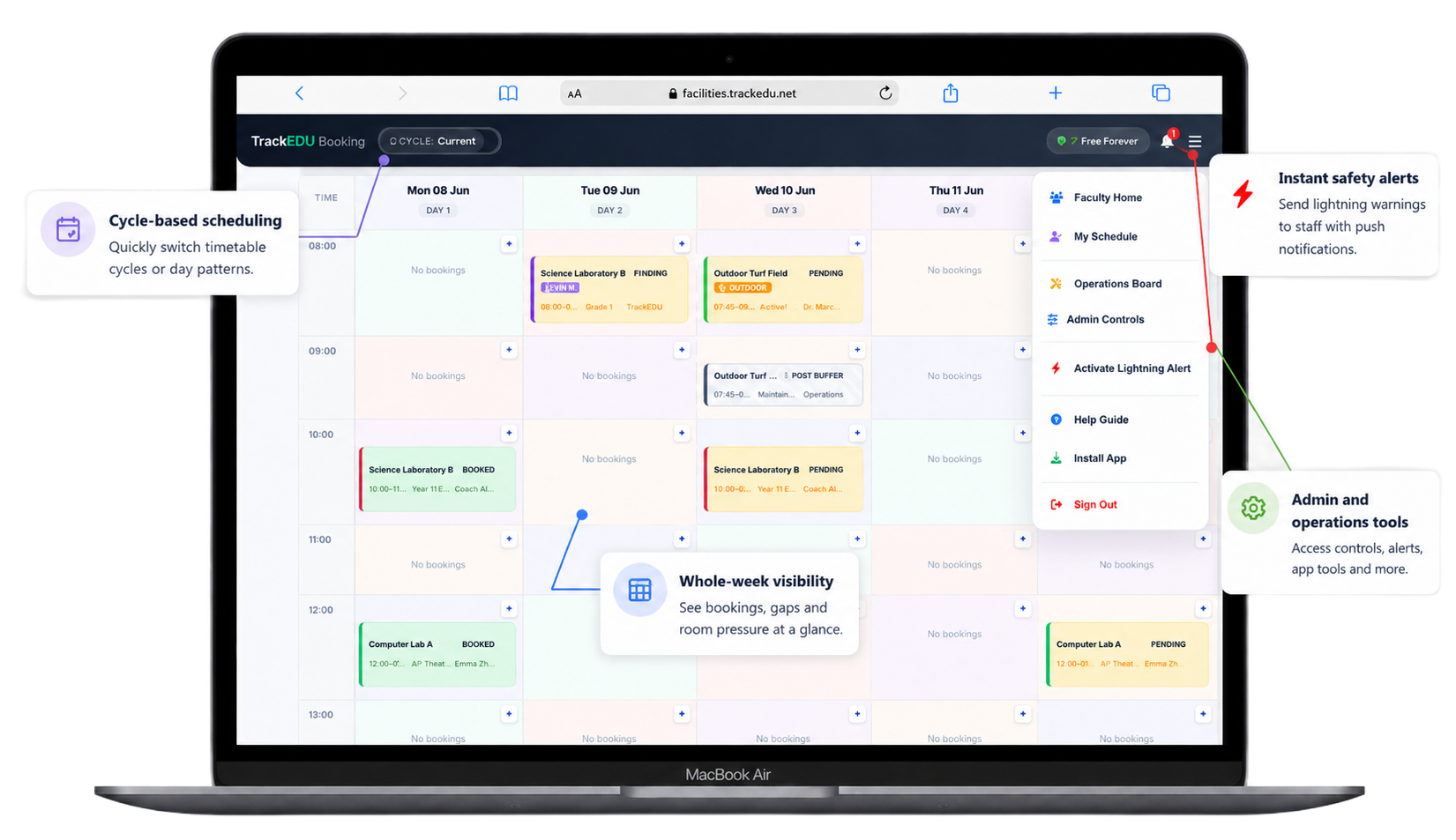
School room booking sounds simple until several departments need the same hall, a science lab requires approval, a field closes because of weather, a recurring timetable collides with an event, or the site team needs to know that 120 chairs must be set up before first period.
The problem is rarely a lack of calendars. The problem is that availability, approvals, booking rules, closures and operational information are often spread across different places. A useful school facility booking system brings those decisions together.
The best school room booking system is one that lets staff see what is genuinely available, prevents conflicting bookings, supports the way a school timetable actually works and gives administrators enough control without making every simple booking an administrative task.
What is a school facility booking system?
A school facility booking system is a shared digital booking calendar for rooms and spaces used across a school, college or university. Instead of relying on separate spreadsheets, paper diaries, email chains or department-specific calendars, staff use one system to check availability and reserve the space they need.
Depending on the campus, those spaces might include classrooms, meeting rooms, sports halls, fields, courts, laboratories, libraries, auditoriums, theatres, music rooms, studios, maker spaces and examination rooms.
A school-focused system should do more than simply record a reservation. It should understand that some spaces can be booked instantly, others need approval, some bookings repeat across a timetable cycle, and rooms can suddenly become unavailable because of maintenance, exams, events or severe weather.
Room booking software vs facilities management software
These terms overlap, but they are not always identical. Room booking software focuses on who is using a space and when. Broader facilities management software may also cover assets, maintenance, work orders, compliance and building operations. Many schools primarily need the first problem solved: one reliable place to see and book shared spaces.
Why school room booking breaks down
Most booking problems begin with a process that worked when only a few people used it. A department creates a spreadsheet. A hall gets its own Google Calendar. The library has a separate booking form. PE staff keep a timetable. Operations record events elsewhere. Over time, no single source shows the complete picture.
Spreadsheet booking
Easy to start, but vulnerable to overwrites, inconsistent formatting, stale information and simultaneous edits.
Email requests
Creates hidden booking queues and forces staff to wait for confirmation instead of checking live availability themselves.
Separate calendars
Useful for individual spaces, but difficult when a teacher wants to find any suitable room that is available at a particular time.
Physical checking
Staff waste time walking to a room or asking colleagues because they do not trust the booking information they can see.
The real cost is uncertainty
A double-booked room is inconvenient, but uncertainty causes even more friction. Teachers build backup plans, administrators answer repetitive questions, site teams receive late setup requests and underused rooms remain invisible because nobody knows they are free.
A live school booking calendar reduces that uncertainty. Staff can check before they move, reserve before they email and see changes before they arrive at the room.
Which school spaces should be bookable?
The answer is usually broader than “classrooms”. Schools often get the biggest value from managing shared or high-demand spaces where clashes are most disruptive.
Sports facilities
Sports halls, gyms, fields, courts, pools and activity spaces often have timetable, weather and event dependencies.
Libraries
Class visits, reading rooms, study spaces, library lessons and events can compete for the same shared areas.
Labs and specialist rooms
Science labs, computer rooms, studios and maker spaces may need equipment-aware booking or administrator approval.
Halls and performance spaces
Assemblies, rehearsals, exams, productions, parent events and meetings can affect large parts of the school day.
Shared classrooms
Useful for cover lessons, split groups, interventions, visiting teachers, examinations and temporary room changes.
Meeting and training rooms
Leadership meetings, parent conferences, staff training and external visitors need visible availability too.
10 features that matter in school facility booking software
Feature lists can become enormous. For most education teams, these ten capabilities make the clearest operational difference.
1. Live availability
Staff should be able to see which rooms are free for the date and time they actually need.
2. Conflict prevention
The system should stop two people confirming the same space for overlapping times.
3. Recurring bookings
Schools need weekly or timetable-cycle reservations without manually entering every date.
4. Approval workflows
High-demand or specialist spaces should be able to require review while everyday rooms remain quick to book.
5. Closures and blocks
Administrators need to close spaces for repairs, examinations, events, holidays or other operational reasons.
6. Weather response
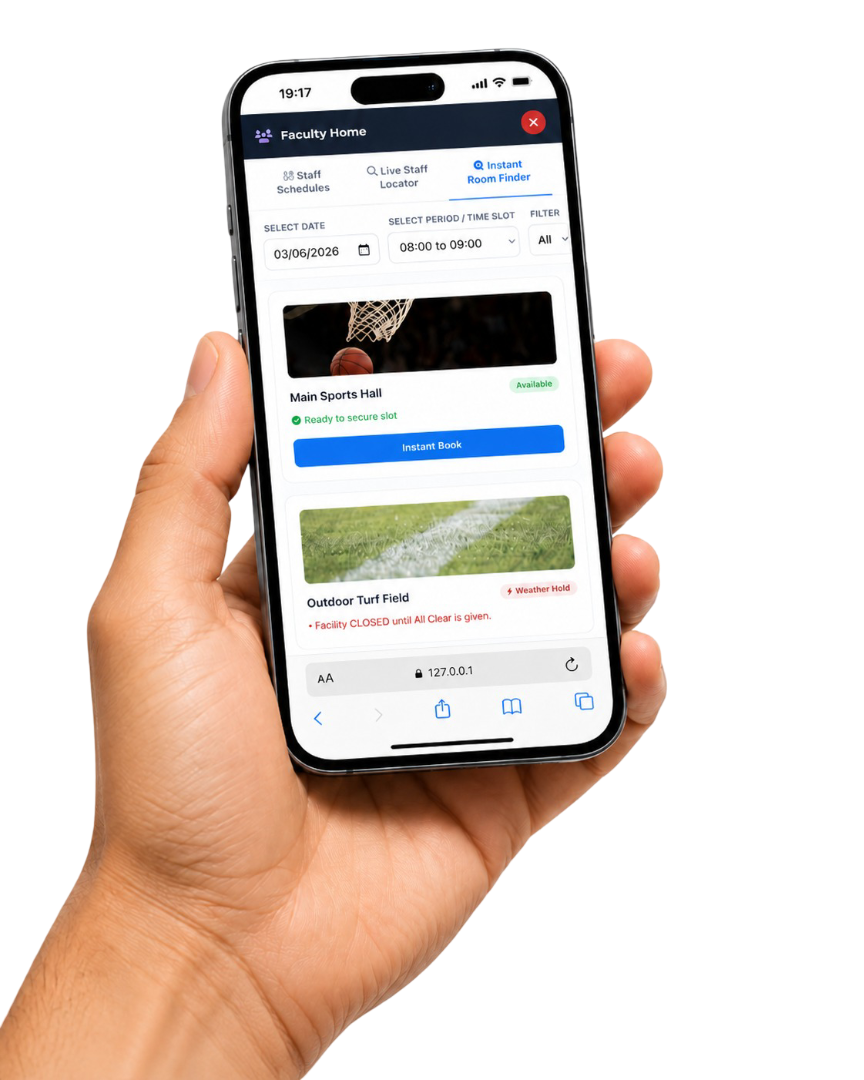
Outdoor areas may need rapid closure during lightning, heavy rain, extreme heat or unsafe conditions.
7. QR check-in
Door-based check-in can connect a physical space to its live booking status and help confirm whether a reservation is being used.
8. Auto-release
If a reserved room is not used or checked into, returning it to the available pool improves utilisation.
9. Setup requests
Site teams need advance notice when a booking requires chairs, tables, AV equipment or a particular layout.
10. Mobile access
Teachers and support staff should not need to return to a desktop computer just to check whether a room is free.
A useful test
Ask a teacher: “Can you find an available room for period 4 tomorrow in under 30 seconds?” If the answer requires opening several calendars, messaging somebody or walking to the space, the booking process is creating avoidable friction.
Spreadsheet, shared calendar or dedicated school booking system?
| Capability | Spreadsheet | Generic shared calendar | School facility booking system |
|---|---|---|---|
| Live room availability | Limited | Yes, per calendar | Yes, across spaces |
| Automatic clash prevention | Weak | Usually | Yes |
| Find any suitable free room | Manual | Often awkward | Designed for it |
| Approval workflow | Manual | Limited | Yes |
| Recurring timetable bookings | Manual | Possible | Purpose-built |
| Maintenance / weather closures | Manual edits | Separate entries | Central controls |
| QR check-in / auto-release | Rare | Rare | Available in specialist systems |
| Site-team setup requests | Separate process | Usually separate | Can be connected |
A generic calendar is not a bad tool. It simply solves a different problem. Calendars are excellent when staff already know which room they want. A facility booking system becomes more valuable when the question is: “What suitable space is free?”
Why different school teams need the same booking picture
PE departments
PE is unusually sensitive to shared-space conflicts. Sports halls, fields and courts may be used for curriculum lessons, fixtures, clubs, assemblies, examinations and external events. Weather can also change availability at short notice. A central system helps staff see the consequence of a closure or event before the lesson begins.
Libraries
School libraries often operate as several spaces at once: teaching area, reading space, study zone, meeting venue and event space. A shared school booking calendar can make class visits and library lessons visible without relying on a separate email chain.
Science, computing and specialist teaching
Labs and specialist rooms may require additional control because they contain equipment, have capacity limits or need technician support. Approval rules allow a school to keep these spaces bookable without making them completely unrestricted.
Operations and site teams
A booking is often only the beginning. Events may require furniture, staging, AV equipment, cleaning or a particular room layout. Connecting the booking to setup information means the site team receives the operational detail earlier.
How to introduce a school room booking system without creating another abandoned platform
The safest approach is usually to start with one painful, visible problem rather than attempting a whole-campus transformation on day one.
- Choose the spaces with the most friction. This might be the sports hall, library, auditorium or a group of high-demand rooms.
- Set clear booking rules. Decide which spaces are instant-book and which require approval.
- Import or define the school cycle. Make sure staff book against the way your timetable actually operates.
- Nominate one or two administrators. They should own closures, approvals and facility settings.
- Make the system easier than the old workaround. If booking still takes several minutes, staff will return to email and spreadsheets.
- Expand after the pilot works. Add more spaces and departments once staff trust the availability data.
Do not run two booking systems indefinitely
A digital system only becomes reliable when staff know where the authoritative booking lives. Keeping a spreadsheet, paper diary and new booking platform active at the same time preserves the uncertainty you were trying to remove.
How TrackEDU Facilities approaches school booking
TrackEDU Facilities is built specifically around school, college and university shared spaces. Staff can check availability, book rooms and manage recurring use from a shared calendar, while administrators control approvals, closures and access.
The current product also includes QR check-in, auto-release for unused spaces, operations requests, calendar feeds, mobile access, Google and Microsoft sign-in workflows, and tools for closing rooms or outdoor areas when they become unavailable.
Try TrackEDU Facilities Pro free until 22 July 2027.
Schools, colleges and universities can currently use Pro with up to 30 bookable spaces and 200 users, with no credit card required. After the launch period, Pro is US$399/year, or you can move back to Free Starter.
Frequently asked questions about school facility booking
What is the best way to stop school room double-bookings?
Use one authoritative booking calendar that checks availability before confirmation. The biggest risk comes from multiple disconnected sources such as spreadsheets, separate calendars and email-based reservations.
Can school room booking software manage recurring timetable lessons?
Yes. A school-focused system should support recurring bookings so regular lessons or activities can be reserved without entering every date individually.
Can different rooms have different booking rules?
They should. A normal classroom may be available for instant booking while a theatre, sports hall or specialist lab may need administrator approval.
Can a school close rooms for maintenance or events?
Yes. Administrators should be able to block rooms or spaces for repairs, examinations, events, holidays or other closures so staff do not make bookings that cannot be honoured.
Can outdoor sports spaces be closed quickly during bad weather?
Yes. School facility systems can support temporary closures of fields and courts when lightning, rain, heat or other conditions make outdoor use unsafe.
Does TrackEDU Facilities work on phones and tablets?
Yes. TrackEDU Facilities is web-based and works across phones, tablets and desktop devices, which helps staff check availability while moving around campus.
Can we test TrackEDU Facilities before paying?
Yes. Free Starter is available, and the current launch offer gives eligible schools, colleges and universities Pro access free until 22 July 2027 with no credit card required.
One reliable booking source is the goal
The technology matters, but the outcome is simpler: staff should know where to look, trust what they see and be able to reserve a space without creating another message thread.
If your school is still using a mixture of spreadsheets, paper lists, shared calendars and informal messages, moving even one high-demand department onto a dedicated booking system can remove a surprising amount of daily friction.
Explore TrackEDU Facilities to see how the shared booking calendar, approvals, room finder, recurring bookings, closures and operations tools work together.